You have just landed at Mallorca Airport. Your bags are with you, the terminal doors are ahead, and your holiday is about to begin.
For many travellers, this is the point at which another wait begins: finding the rental desks, joining a queue, presenting documents, signing paperwork and waiting for someone to hand over the keys. Only then can they walk to the car park and start looking for their vehicle.
With Offugo Keyless, the experience is different. The essential formalities are completed online before collection, and your car is prepared and placed in the airport car park ahead of your arrival. Instead of visiting a rental counter, you follow the information in your personalised check-in page, walk directly to the vehicle and unlock it with your phone. The physical key is waiting inside.
It may sound unfamiliar if you have always collected rental cars from a desk. You may wonder where the car will be, whether you need an app, how a phone can open it, where the key is hidden and what to do when you return.
This guide answers those questions and follows the complete Keyless experience at Mallorca Airport—from receiving access to leaving the car park, and from returning the vehicle to locking it for the final time.
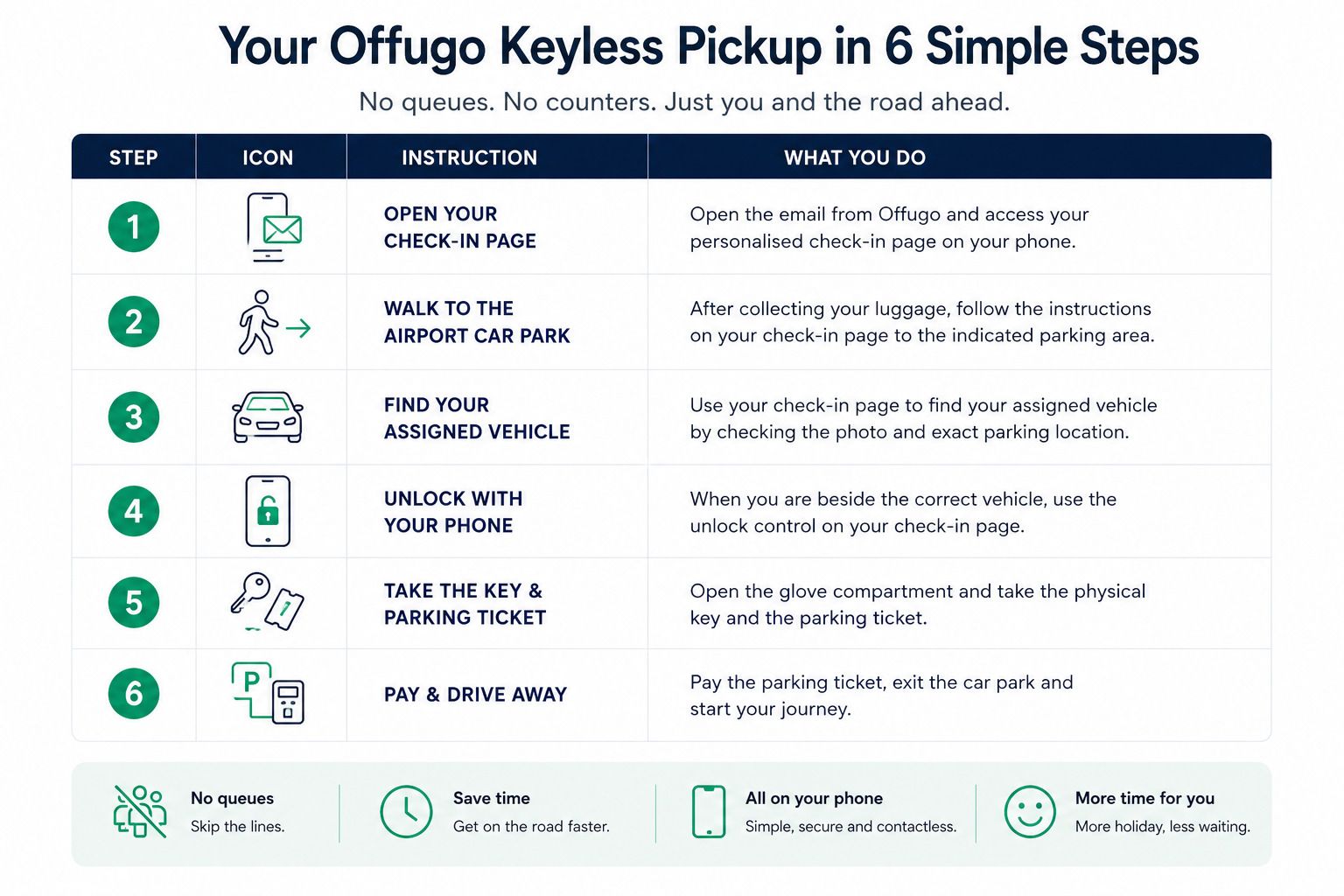
In short: complete your online check-in, use your personalised page to find and unlock the car, take the key and parking ticket from the glove compartment, and drive away. There is no rental-counter stop.
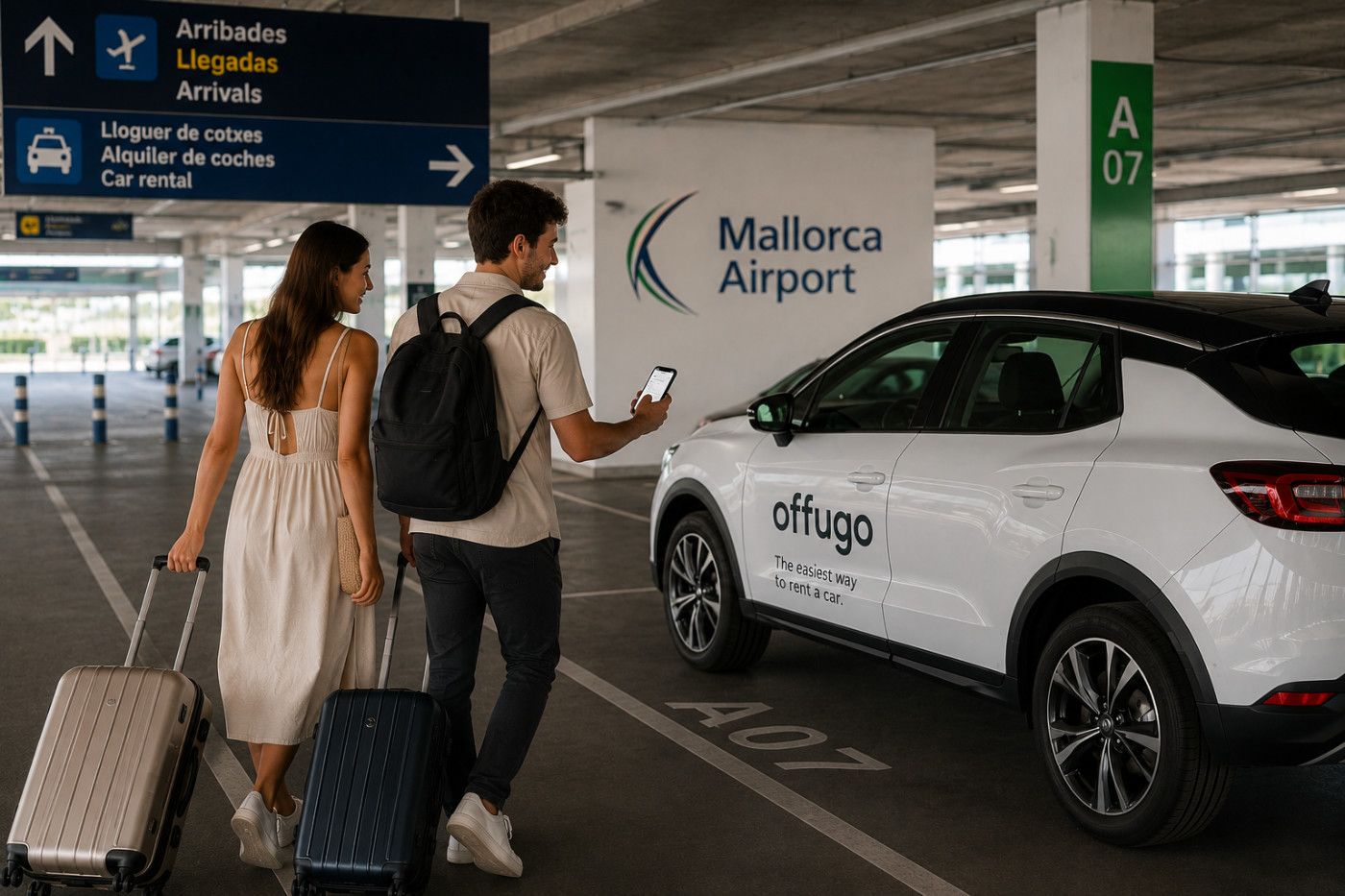
Please note: AI-generated images are used for illustrative purposes. Actual airport and parking areas may differ.
What Is Offugo Keyless Car Rental?
Offugo Keyless is a self-service collection and return option that lets you rent a car without visiting a counter. At Mallorca Airport, you can go directly to your assigned vehicle and unlock it with your phone. Keyless collection is also available at selected Offugo locations across Mallorca.
“Keyless” describes the handover, not the whole drive. You use your phone to locate the assigned vehicle and open it at collection. Once inside, you take the physical key from the glove compartment and use it normally throughout the rental. At the end of the trip, you put the key back inside and complete the return from your phone.
At Mallorca Airport, there are two ways to reach your Keyless rental car, depending on the option selected when booking:
-
Direct airport collection: your car is waiting at the airport terminal parking, so you can go directly to your assigned vehicle after arrival.
-
Shuttle collection: a shuttle picks you up at the airport and takes you to the location where your car is waiting.
In both cases, the collection itself is Keyless: once you reach your assigned vehicle, you unlock it with your phone and collect the physical key from inside.
The service does not require a separate app. The collection and return controls appear in the personalised check-in page linked from Offugo’s communications. You will need a mobile phone with internet access when collecting and returning the vehicle.
Before travelling, you must complete the required online check-in steps. This is where the information normally handled at a rental desk is dealt with in advance. Once the process is complete and your access is available, the check-in page becomes your guide at the airport: it shows the details you need to find the vehicle and provides the controls for opening and returning it.
The result is simple: no queue, no counter and no airport paperwork at the moment when you would rather be starting your journey.
For full details about identification, document validation and the general rental process, see Offugo’s How It Works guide and service conditions. This article concentrates on what happens during a Keyless collection and return at Mallorca Airport.
Behind the Scenes: What Makes a Queue-Free Pickup Possible?
When a car unlocks after a tap on your phone, the experience can feel instant. But a queue-free collection is not the result of technology alone. It is possible because the operational work has already happened before you arrive.
Offugo works with a network of rental providers, allowing us to compare available options and offer customers competitive conditions for their trip. Ahead of the scheduled collection, the provider operating your vehicle prepares it for the next rental. The car is cleaned, checked and made ready for the road. It is then taken to the airport car park and parked in an available space. Once the vehicle is parked, its exact location is added to your collection information so you can easily find it when you arrive. The physical key and the parking ticket are placed in the glove compartment so that everything you need is waiting inside.
Your booking is also connected with the assigned vehicle, and your personalised check-in page provides the location and access controls you will use. The car does not need to be assigned or prepared while you wait; that work has already been moved to the time before your arrival.
In other words, the queue has not disappeared by accident. A team has invested its time in cleaning, checking, positioning and preparing the car so that you do not have to spend your arrival waiting for those tasks to happen.
Keyless combines careful human preparation behind the scenes with simple digital access at collection. The technology removes the handover stop; the operational work ensures that a prepared car is waiting.
Most of the work happens before you land, so your journey can begin at the car—not at the rental counter.
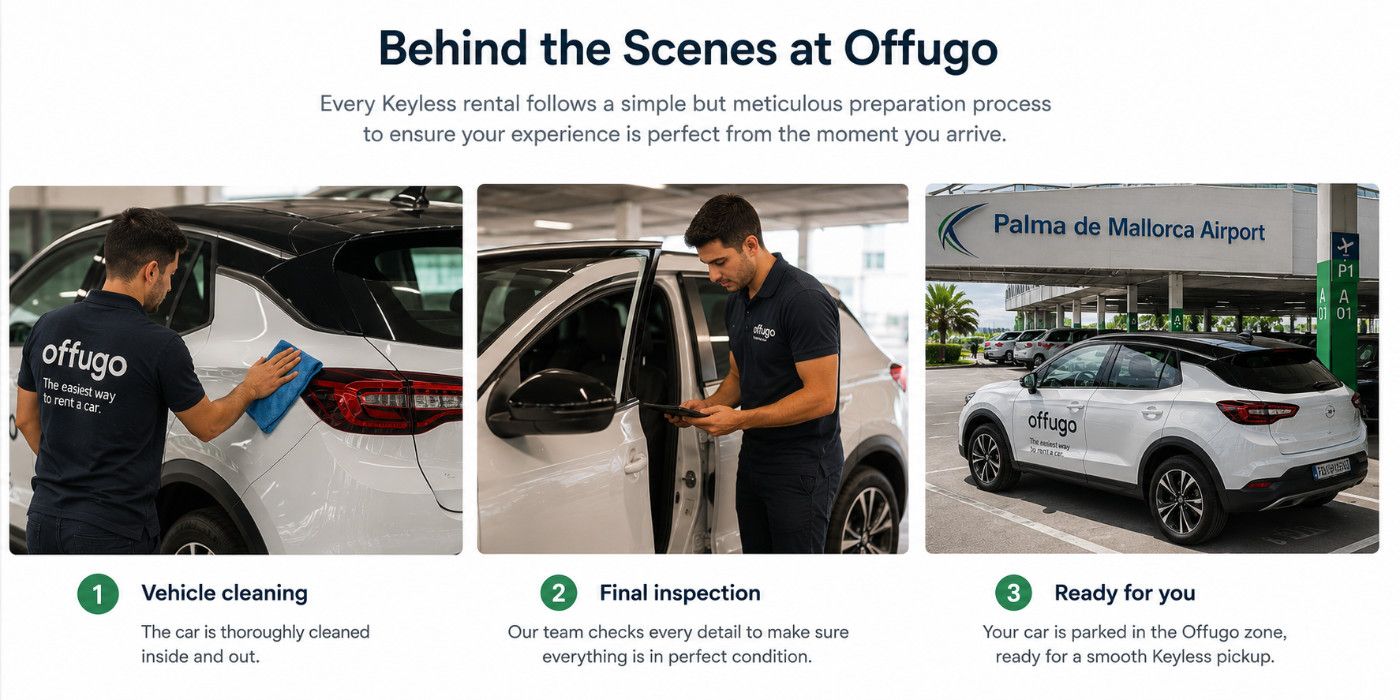
Please note: AI-generated images are used for illustrative purposes.
From Landing to Driving: The Complete Keyless Pickup Journey
1. Open Your Personalised Check-in Page
Before collection, Offugo sends you an email that leads to your personalised check-in page. The collection and return links become available in advance of the booking—normally 24 hours before—once the necessary check-in steps have been completed.
Keep that email easy to find. When you arrive, open its link on the internet-connected phone you will use beside the car. The page contains the instructions, location and controls for your booking.
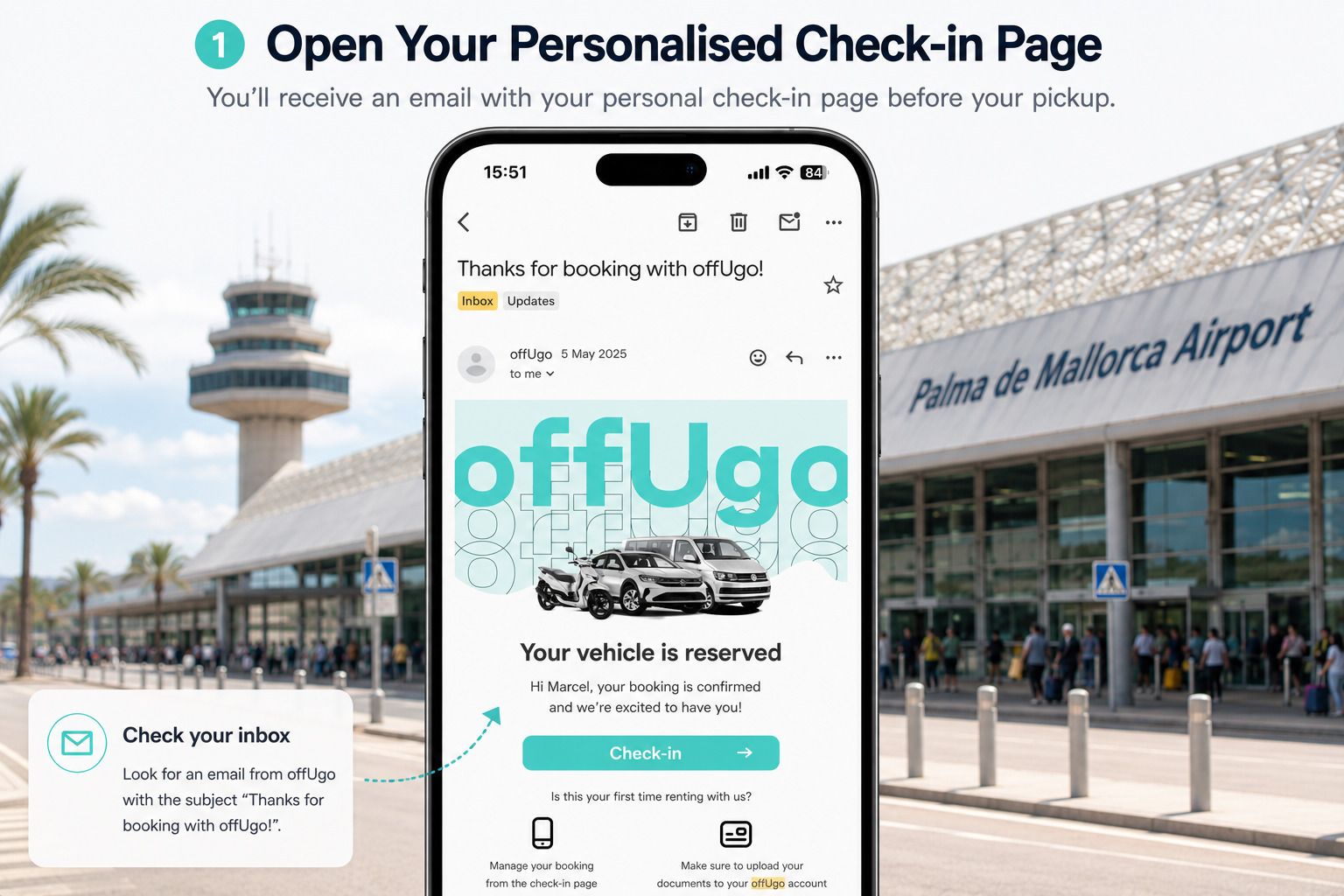
Please note: AI-generated images are used for illustrative purposes. Actual airport and parking areas may differ.
There is no need to download a dedicated app. You work from the link in your browser. Before leaving home, it is sensible to make sure your phone is charged and that you will have mobile data or another reliable internet connection in Mallorca.
2. Go Directly to the Airport Car Park
Once you have collected your luggage, follow the collection instructions shown in your check-in page and walk towards the indicated parking area. There is no need to look for an Offugo rental desk or join a queue inside the terminal.
Use the live instructions for your booking, as parking arrangements and the precise route can change.
Once you've left the arrivals hall, collecting your vehicle is straightforward. Simply follow the airport signs to the parking building and then use your personal check-in page to guide you to the exact location of your car.
The process is illustrated below.
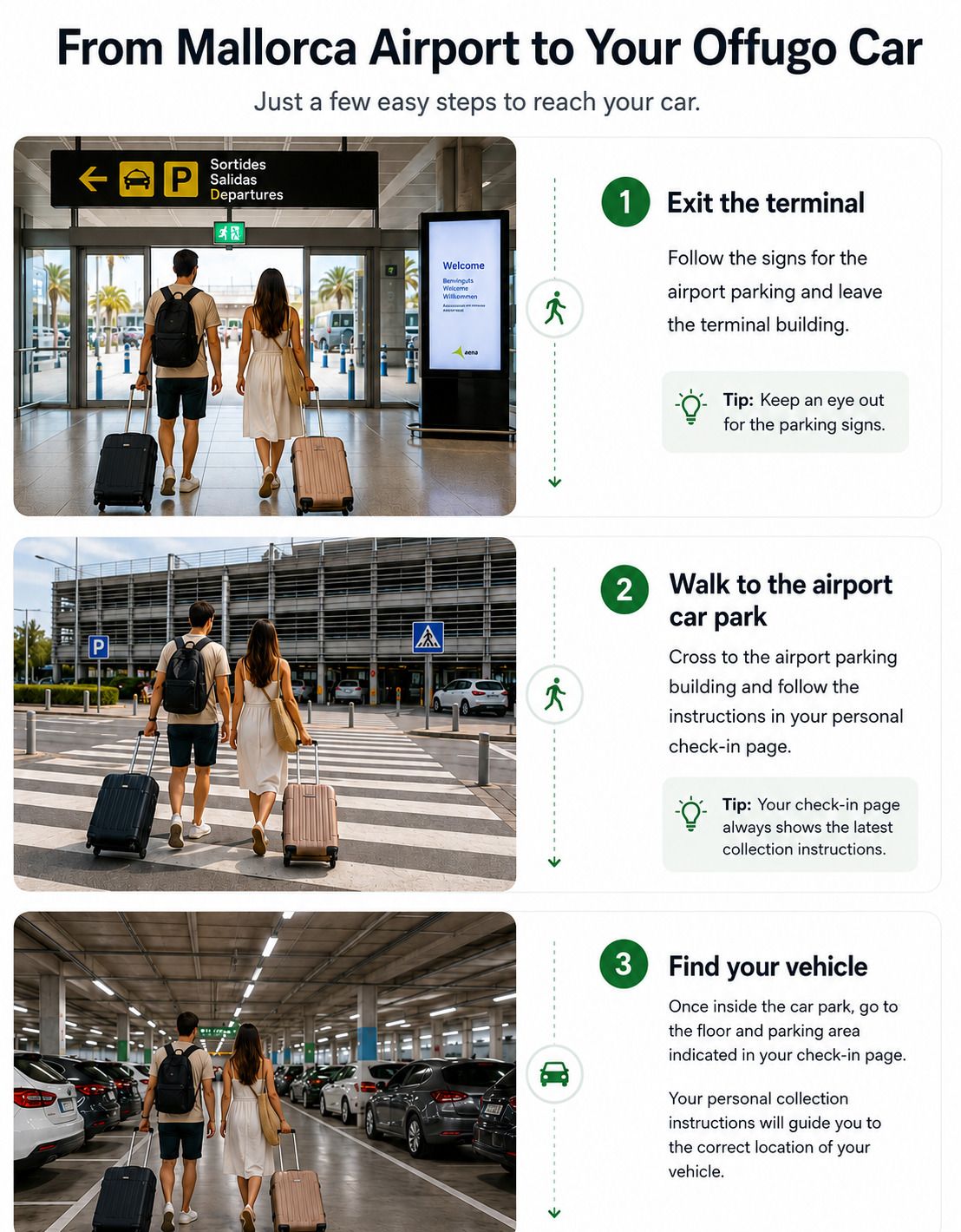
Please note: AI-generated images are used for illustrative purposes. Actual airport and parking areas may differ.
3. Find Your Assigned Vehicle
Your personalised check-in page tells you exactly where your vehicle is parked.
It displays a photo of the assigned vehicle together with its parking location, including the floor, parking area and space number. Simply follow those instructions until you reach the indicated parking bay.
Once you're there, compare the vehicle in front of you with the photo shown on your check-in page. When everything matches, you're ready for the next step: unlocking your car with your phone.
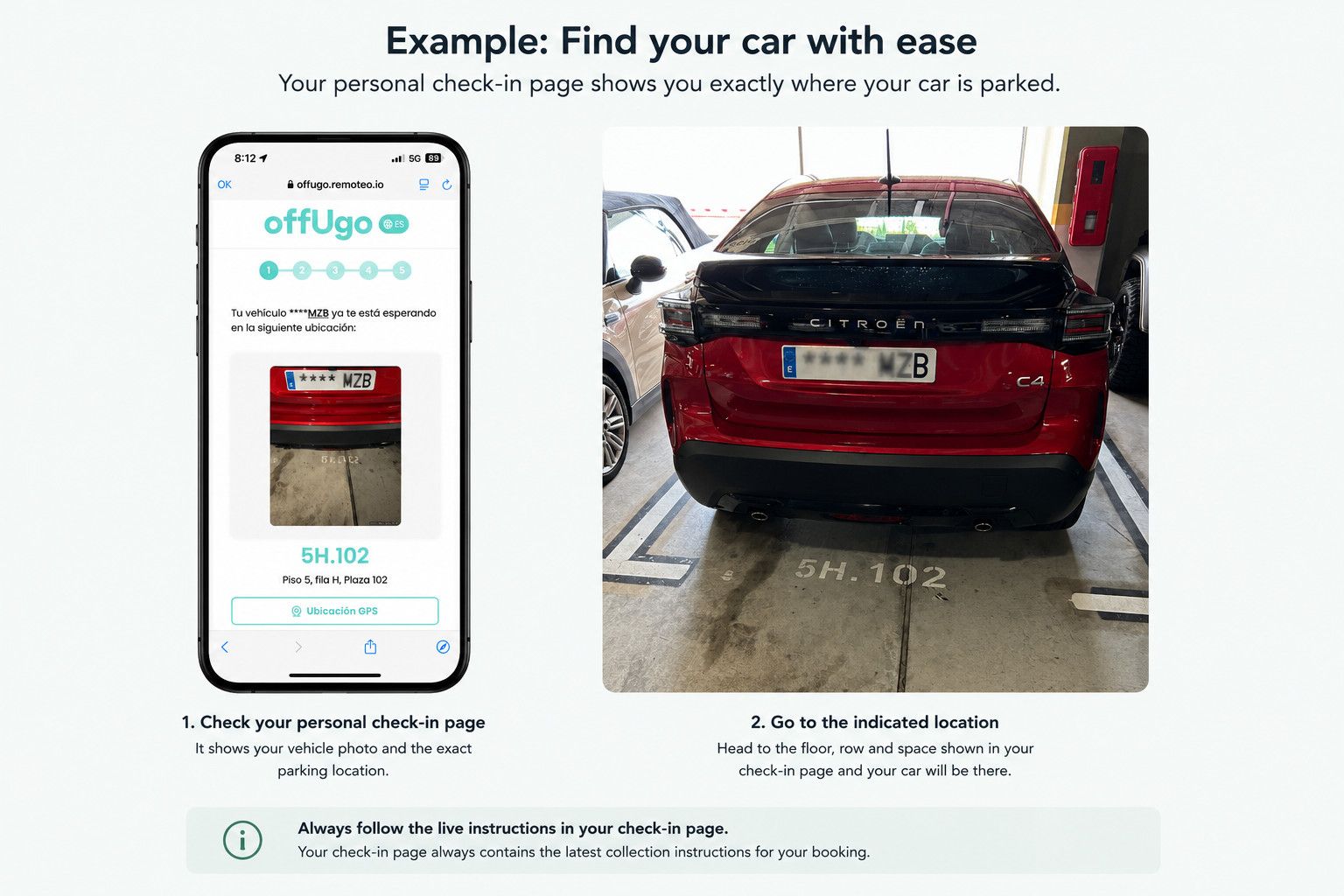
If you cannot find the car immediately, recheck the location and vehicle details in the page and follow any help instructions included there. Do not try to open a similar-looking vehicle nearby.
Good to know Your vehicle location may vary depending on your booking and operational requirements. For that reason, always follow the live instructions in your personal check-in page, as they contain the latest location for your vehicle.
4. Unlock the Car with Your Phone
When you are standing beside the correct vehicle, open the collection section on your check-in page and follow the on-screen steps. Use the unlock control only when you have reached the car and are ready to get in.
Once the car confirms that it has unlocked, open a door normally. There is no member of staff waiting with a key and no lockbox code to collect at a desk: your personalised link provides access to the prepared vehicle.
Keep the browser page open until the unlock has completed. You have up to three attempts to unlock the vehicle. If you experience any problems, check your phone’s internet connection and follow the instructions shown on the collection page. You will also have the rental provider’s phone number available in case you need assistance.
Once the car has been successfully unlocked, you will be asked to confirm the vehicle’s fuel level before continuing with the collection process.
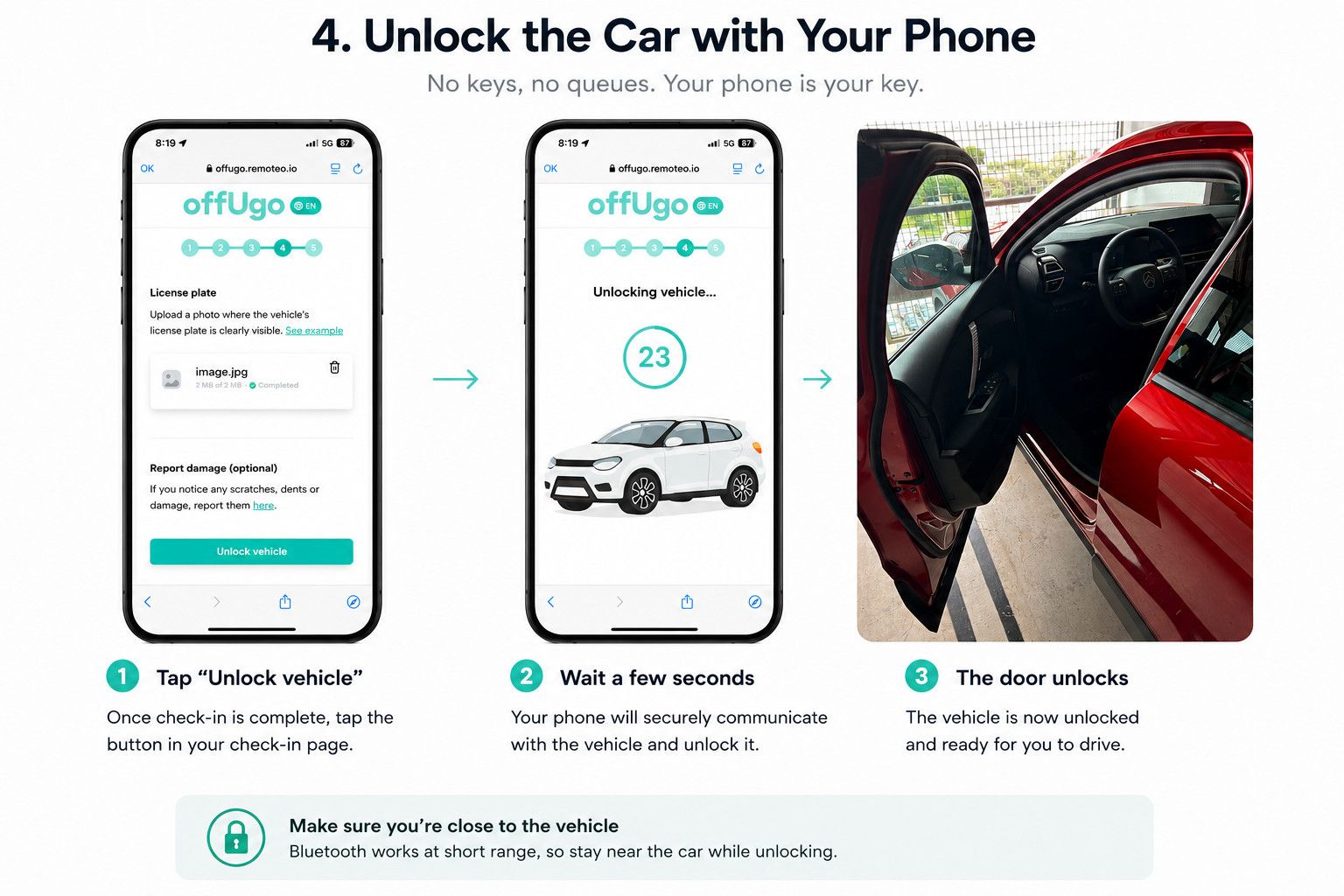
Prefer to see it in action? See how an Offugo Keyless vehicle is opened by phone at collection:
https://www.youtube.com/watch?v=57opHpBNuSY
5. Open the Glove Compartment
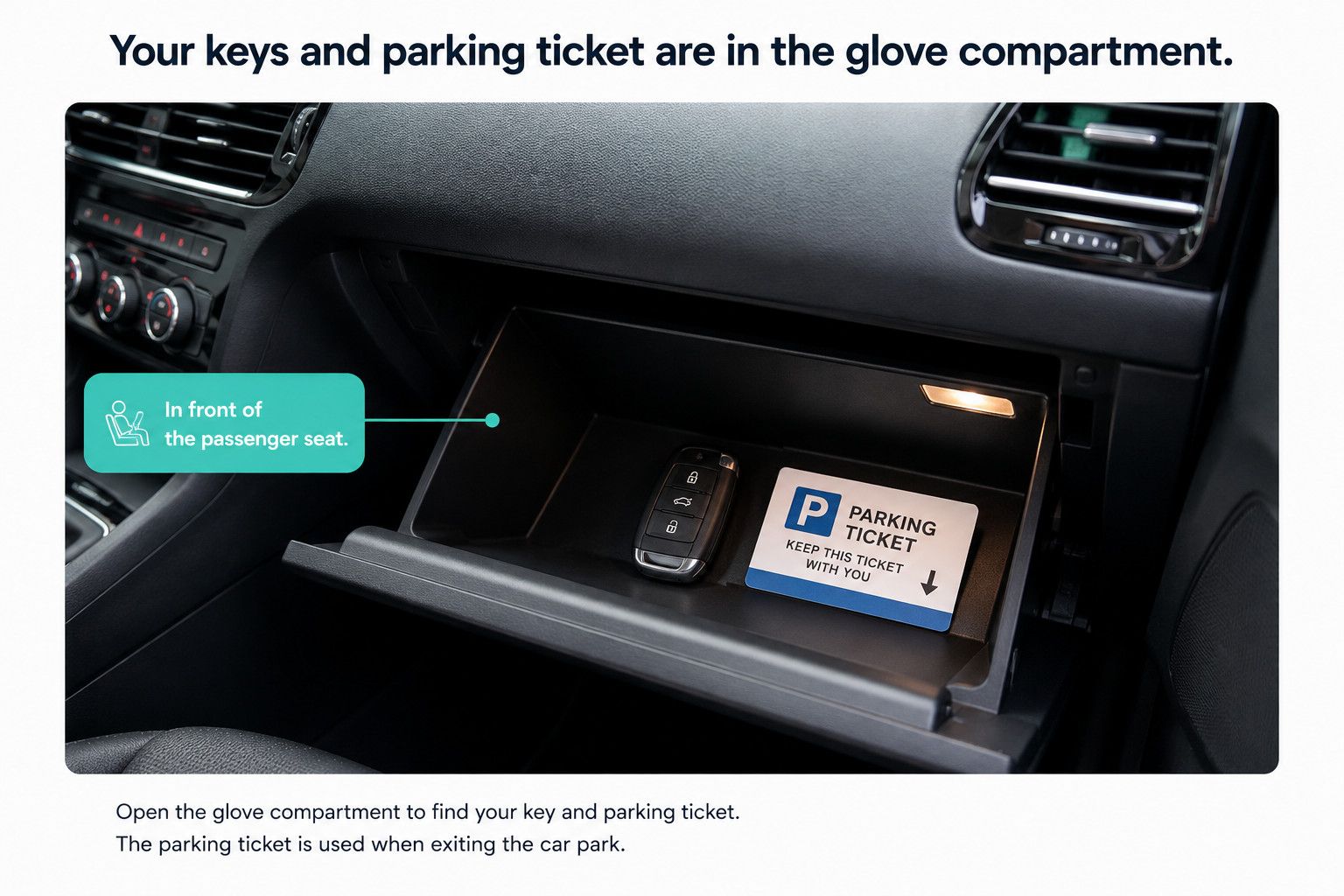
Once inside the vehicle, open the glove compartment in front of the front passenger seat. This is where you will normally find two important items:
- the physical car key; and
- the parking ticket needed to leave the airport car park.
Take both before setting off. Although your phone opened the vehicle for collection, you will use the physical key normally during the rental. You do not need to return to the browser every time you park in Mallorca.
This distinction is worth remembering: the mobile controls manage the Keyless handover at the beginning and end of the booking; the car key is used for everyday driving in between.
Before leaving, check that the key and ticket are present. Follow your booking instructions if either is missing or anything is not as expected.
6. Pay the Parking Ticket and Leave the Airport
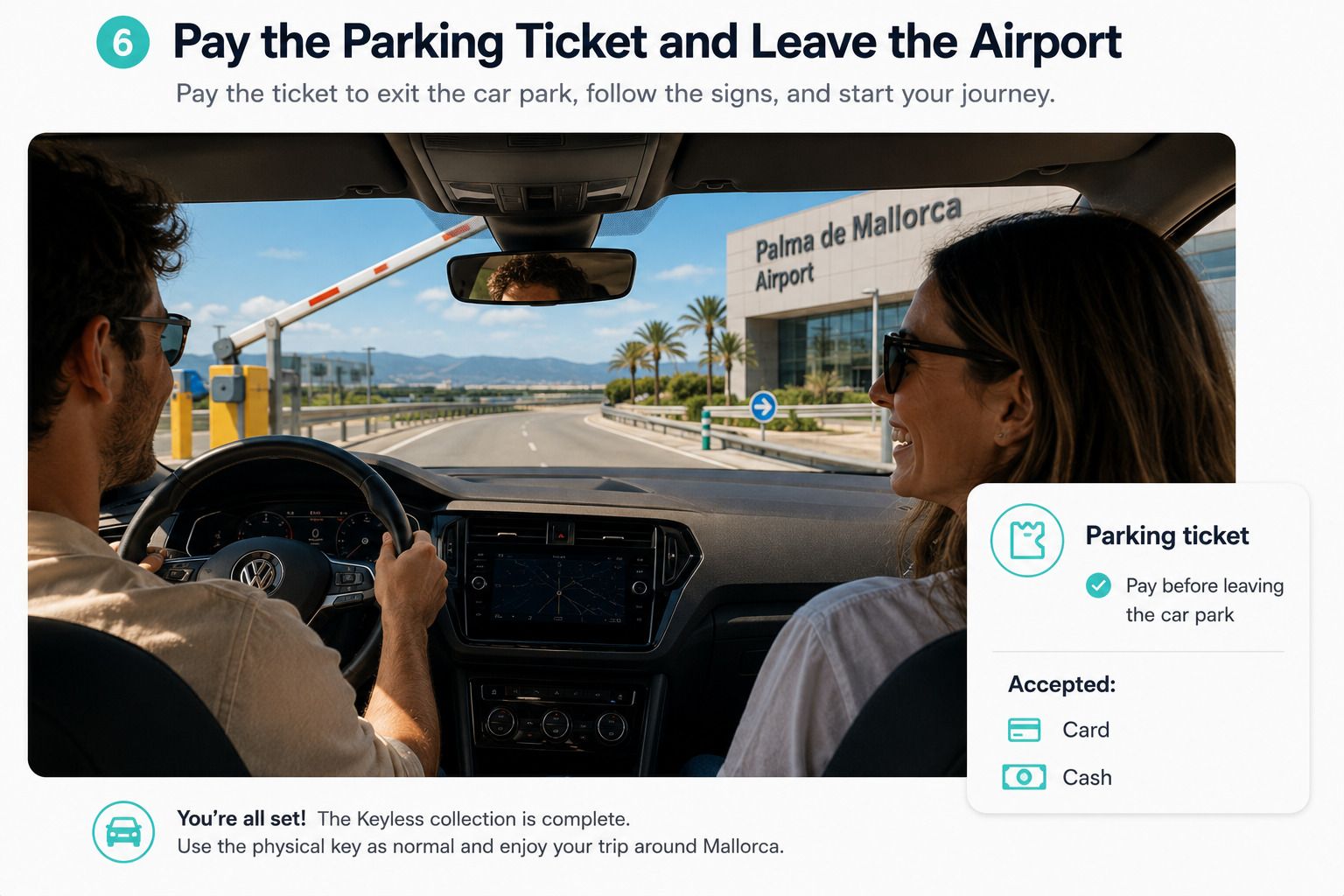
When collecting your car, you will find the parking ticket in the glove compartment. You will need to pay this ticket before leaving the airport car park, but your parking cost will never exceed €15. If the ticket costs more than €15, Offugo will cover the difference.
Offugo advises paying at one of the car park payment machines. Credit or debit cards and cash can be used at the payment machines. Payment may also be possible directly at the exit barrier, but cash payments are only available at the payment machines. Check the payment instructions on the day in case the available methods differ.
After payment, follow the exit signs and leave the car park. The Keyless collection is complete; use the physical key normally and begin your journey.
Please note: AI-generated images are used for illustrative purposes. Actual airport and parking areas may differ.
Keyless Collection Checklist
Before you drive away, make sure you have completed these steps:
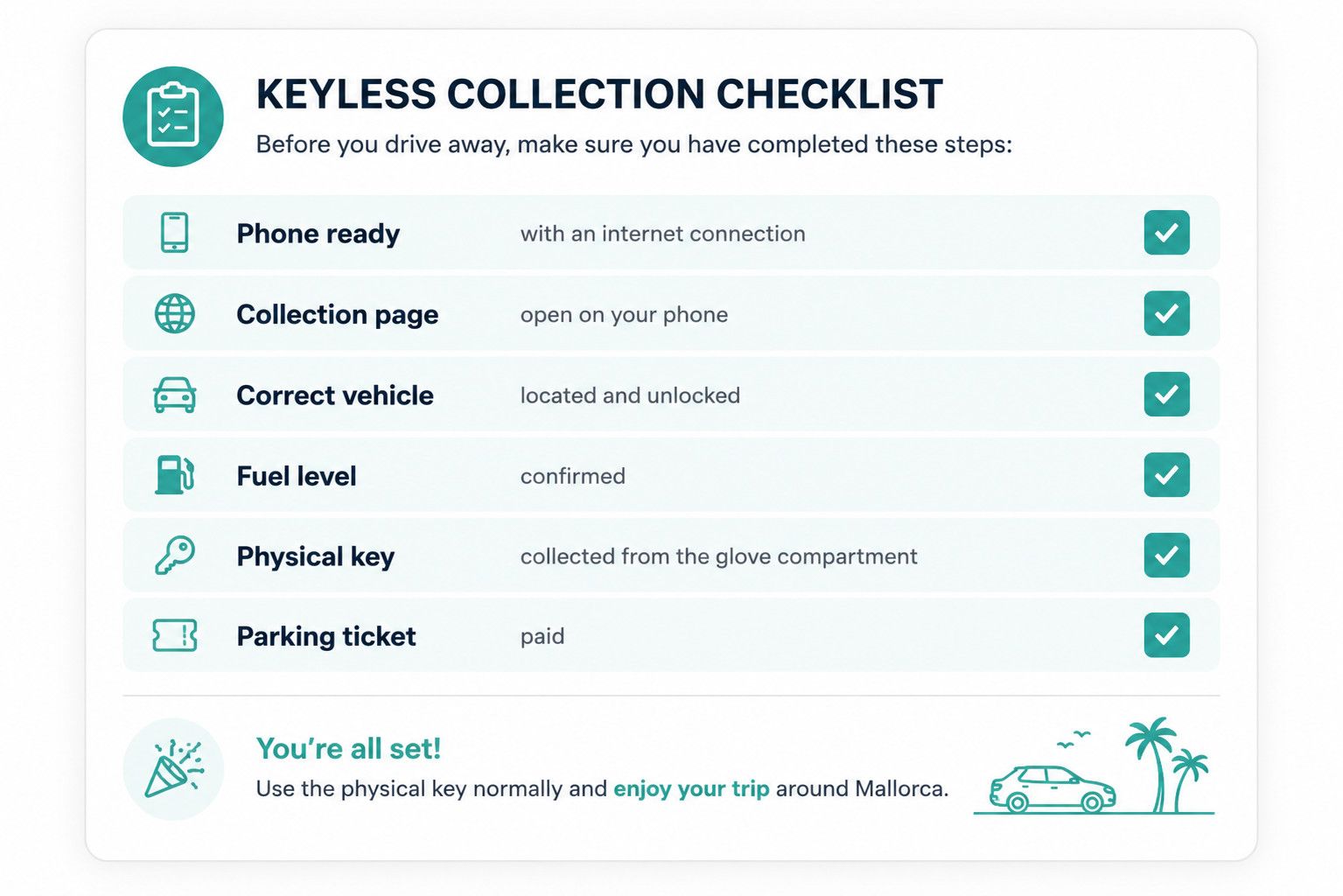
You're all set — use the physical key normally and enjoy your trip around Mallorca.
How to Return Your Offugo Keyless Car
The return follows the same principle as collection: the instructions and final locking step are handled through your personalised page rather than at a counter.
1. Follow the Return Instructions
24 hours before your scheduled return time, you will receive a reminder email with a link to your check-in page. Open the link to access the current return instructions and follow the steps provided before driving to the airport.
Return the car to the airport parking area or location specified for your booking. Offugo’s guidance says to use a free space that is not reserved or used by another rental company, but the directions in your return link and confirmation voucher should always take priority.
2. Leave the Key and Parking Ticket Inside in the Glove Compartment
Once parked, make sure you have removed all personal belongings. Put the physical key back in the glove compartment, in front of the passenger seat, together with the new parking ticket produced when you entered the car park, following the instructions shown for your booking.
Do not take the parking ticket with you. Unlike at collection, you do not pay this return ticket: Offugo’s official guidance states that the company takes care of the parking cost for a Go Keyless return.
3. Get Out and Lock the Vehicle from Your Phone
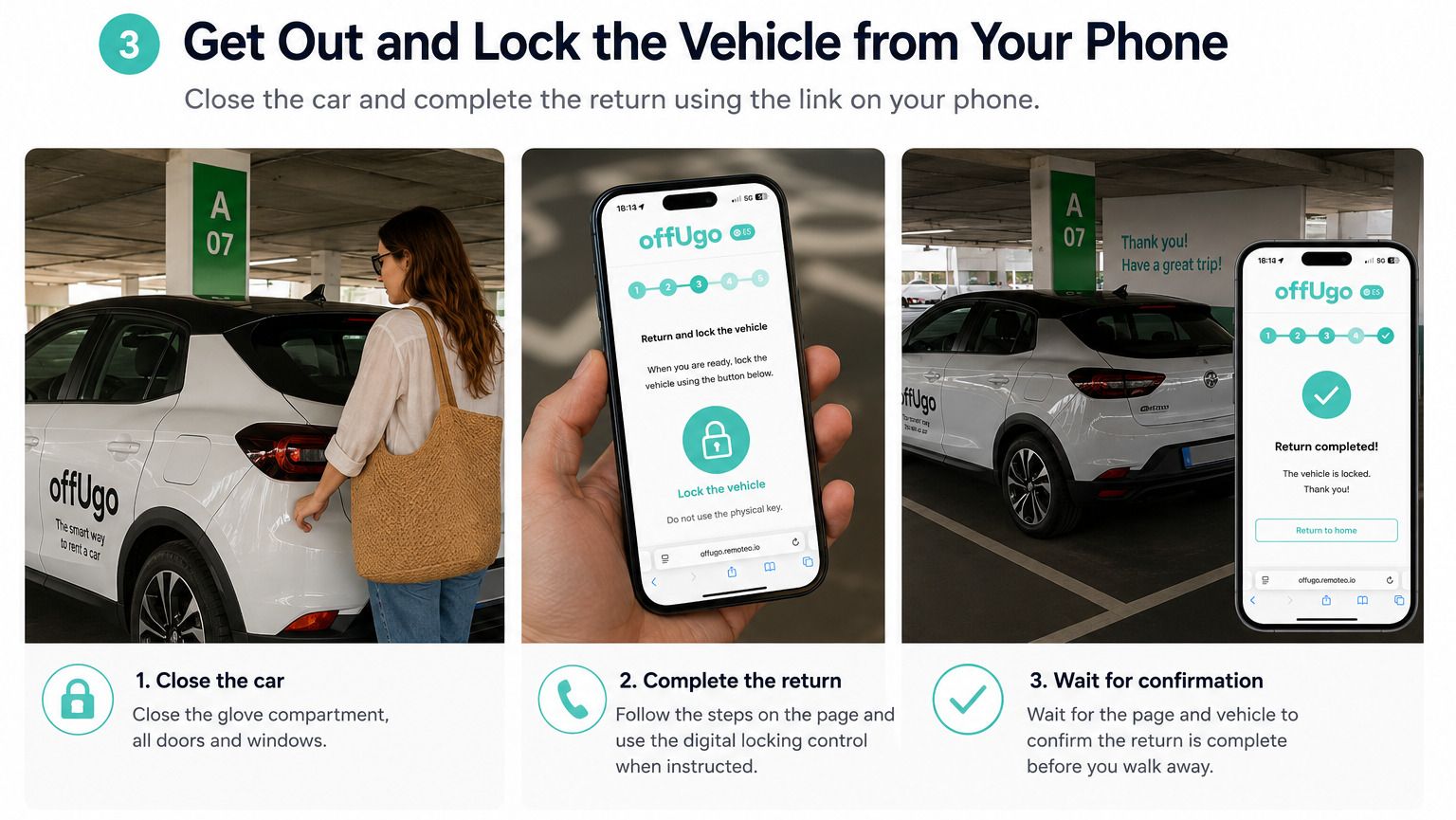
Close the glove compartment and all doors, then complete the return process through the link on your phone. Follow each prompt and use the digital locking control when instructed.
Do not lock the vehicle with the physical key. The key must remain inside so that the operations team can access it after the digital return. Before walking away, wait for the page and vehicle to confirm that the car is locked and the return has been completed.
If the car does not lock or the return page does not confirm that the process has been completed, contact your car supplier directly — their phone number is available on your check-in page and they can help you immediately. You can also contact Offugo Support if you need any additional help.
Please note: AI-generated images are used for illustrative purposes. Actual airport and parking areas may differ.
Why Travellers Choose Keyless Pickup at Mallorca Airport
Keyless pickup isn't just about unlocking your car with your phone. It's designed to remove unnecessary steps from your arrival, so you can spend less time dealing with formalities and more time enjoying your trip.
Some of the benefits travellers appreciate most include:
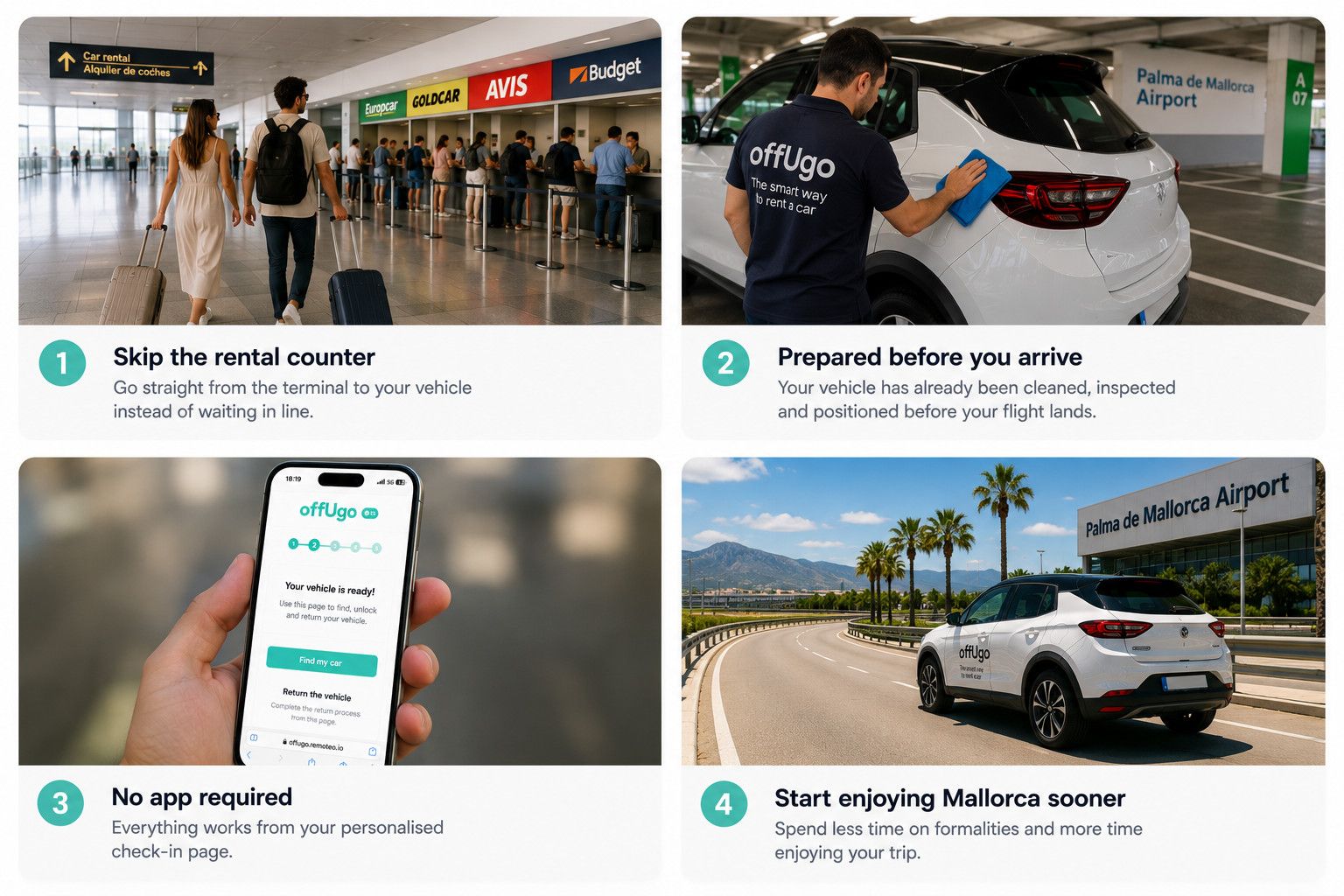
- Skip the rental-counter queue – Go straight from the terminal to your vehicle instead of waiting in line.
- A prepared car is already waiting – Your vehicle has been cleaned, inspected and positioned before you land.
- No app required – Everything works from your personalised check-in page, with no additional app to download.
- Start your holiday sooner – Spend less time on administration and more time exploring Mallorca.
Please note: AI-generated images are used for illustrative purposes. Actual airport and parking areas may differ.
Frequently Asked Questions About Offugo Keyless
Do I need to install an app?
No separate app is required. You access the Keyless collection and return functions through the personalised check-in page linked from Offugo’s email. Open it in the browser on an internet-connected phone.
When can I access my Keyless collection?
When you make your booking, you will receive an email with a link to your personalised check-in page. You can access this page from the beginning, where you will see the buttons for both “Pickup your car” and “Return your car”.
The buttons may initially appear disabled. The collection button becomes active shortly before your scheduled pickup time, allowing you to access the instructions you need to find and unlock your vehicle.
There is no additional email sent when the collection button becomes active, so when your pickup time approaches, simply open your personalised check-in page and use the “Pickup your car” button to start the Keyless collection process.
Do I need internet access?
Yes. A mobile phone with internet access is required to complete the Keyless collection and return. Arrange mobile data or another reliable connection and charge your phone before going to the car park.
How do I know where my car is parked?
Once your online check-in is complete and collection access is available, the personalised page provides the information needed to see the exact location of the vehicle. Follow those live directions when you reach the airport car park.
Where is the car key?
The physical key is normally inside the glove compartment, directly in front of the front passenger seat.
If you collect your car directly from the airport terminal car park, you will also find the parking ticket in the glove compartment. You will need this ticket to leave the car park.
If you use the shuttle collection option, you will not need an airport parking ticket, as your vehicle will be collected from a different location outside the terminal car park.
Do I use my phone throughout the whole rental?
No. Your phone is used for the digital collection and return. After opening the car, take the physical key from the glove compartment and use it normally during the trip.
Who pays for the parking ticket at collection?
If you collect your car from the airport terminal car park, you will need to pay the parking ticket found in the glove compartment before leaving, but your parking cost will never exceed €15. If the ticket costs more than €15, Offugo will cover the difference.
Offugo recommends paying at one of the car park payment machines. Credit or debit cards and cash can be used at the payment machines. Payment may also be possible directly at the exit barrier, but cash payments are only available at the payment machines.
What happens to the parking ticket when I return the car?
Take the new ticket when entering the return car park and leave it inside the vehicle as instructed, normally with the key in the glove compartment. Do not pay the return ticket; Offugo states that it handles this parking cost for Go Keyless returns.
Should I lock the car with the physical key when returning it?
No. Leave the physical key inside and lock the car through the return link on your phone. Offugo specifically advises Go Keyless customers not to lock the returned vehicle with the key.
What if my phone is running out of battery?
You need your phone to complete the Keyless collection and return process, so make sure it is charged before travelling and consider carrying a power bank.
If your phone becomes unusable or you are unable to complete the process, contact your car supplier directly — their phone number is available on your check-in page and they can help you immediately. You can also contact Offugo Support if you need any additional help.
Can I inspect the vehicle before driving away?
Absolutely. Before leaving the parking space, we recommend taking a moment to inspect the vehicle.
Your personalised check-in page includes a damage report section where you can review any scratches, dents or other marks that have already been recorded for the vehicle. These existing reports help you understand the current condition of the car before you begin your journey.
If you notice any damage that isn't already listed, you can report it immediately from your phone by uploading photos directly through your check-in page. Any new photos you submit become part of the vehicle's inspection record, helping to ensure that pre-existing damage isn't attributed to your booking.
In most cases, Offugo rentals include comprehensive insurance coverage, providing additional peace of mind in case of accidental damage during your rental. Coverage and conditions may vary depending on the vehicle and rental provider, so always check the insurance details included in your booking to see exactly what is covered.
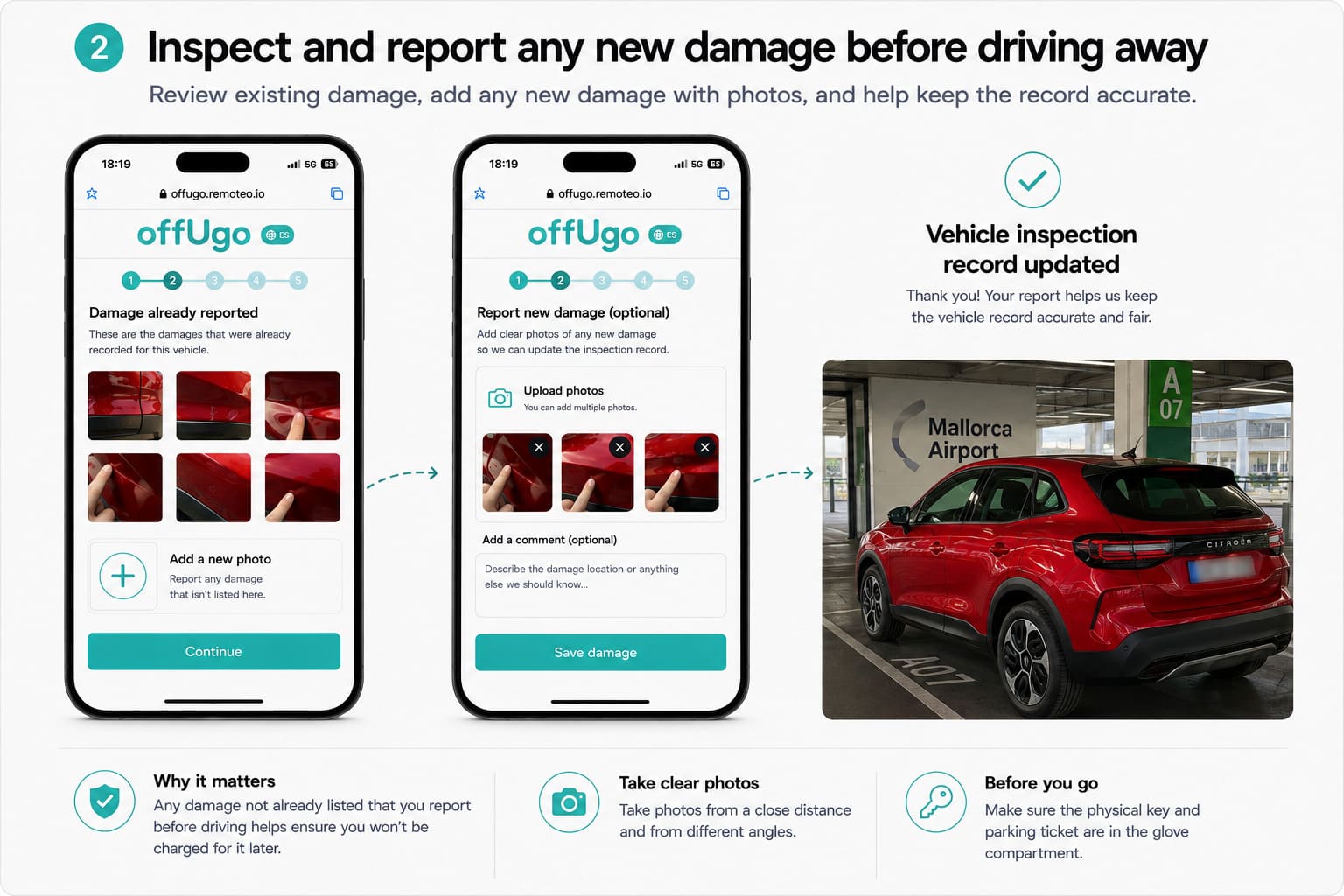
Before driving away, also check that the physical key and parking ticket are inside the glove compartment.
What if my flight is delayed?
If your flight is only slightly delayed, there is usually no need to worry. Your parking cost at collection will still be limited to a maximum of €15, and Offugo will cover any amount above this.
If you expect a longer delay, please contact Offugo as soon as possible so we can coordinate the change with your car supplier and help avoid unnecessary parking costs.
For delays notified at very short notice — for example, less than two or three hours before collection — the car may already have been prepared and parked at the airport. In this case, the parking ticket may be higher, but you will still pay a maximum of €15.
Ready to Skip the Counter at Mallorca Airport?
Offugo Keyless turns car collection into a direct journey from the terminal to a vehicle that has already been cleaned, checked and positioned for you.
Complete your online check-in before travelling, keep your personalised access page ready and follow it to the car. Unlock the vehicle with your phone, take the key and parking ticket from the glove compartment, and leave the airport without visiting a rental counter. When the trip is over, return the key and ticket to the car and lock it through the same digital process.
The experience feels simple because the preparation has already been done.
Ready to begin your Mallorca holiday at the car instead of the rental counter? Book your car at Mallorca Airport with Offugo and choose the Go Keyless option when available.